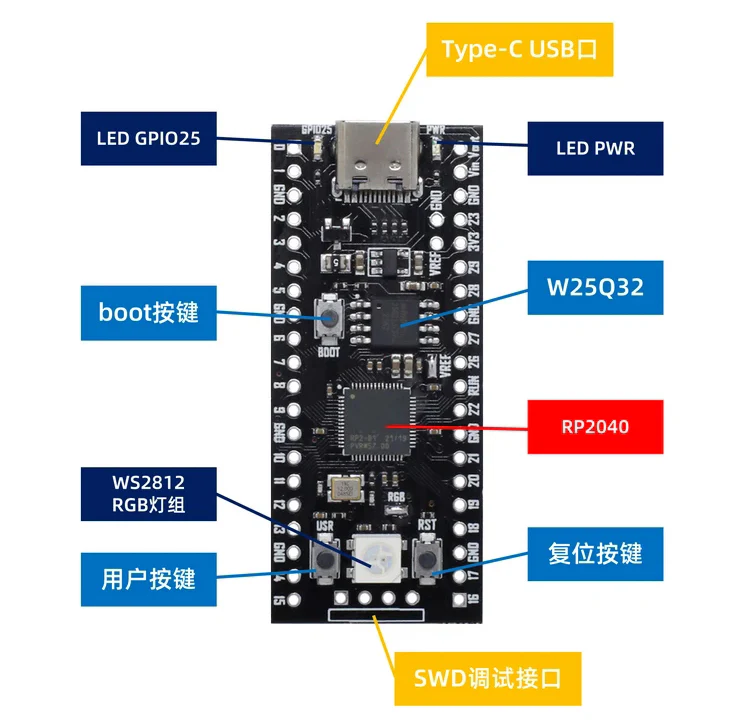
1
(Type-C, 16 MB Flash)
Unleash high-performance embedded computing with the Raspberry Pi Pico RP2040, featuring the powerful, custom-designed RP2040 microcontroller chip. This variant is upgraded with a massive 16 MB of onboard QSPI Flash memory, making it ideal for large-scale MicroPython projects, complex C/C++ applications, and extensive data storage.
This board offers a low-cost, small-package solution with high functionality, driven by a dual-core processor and flexible digital interfaces.
✨ Core Performance & Memory
FeatureSpecificationAdvantageMicrocontrollerRaspberry Pi RP2040 (Designed in the UK)High-performance, low-cost architecture.CPUDual-core Arm Cortex-M0+Flexible clock speed running up to 133 MHz for rapid integer workloads.Memory (Flash)16 MB Onboard QSPI FlashMassive storage for large firmware, extensive libraries, and data logging.RAM264 KB of SRAMSix independent banks of RAM prevent contention, allowing cores and DMA engines to run in parallel.ConnectivityUSB 1.1 with Device and Host supportConvenient Type-C port for power and programming.
🔌 Rich I/O and Interfacing
The RP2040 chip provides a flexible digital interface ecosystem that can connect to almost any external device:
- GPIO: 26 × Multi-function GPIO pins.
- Analog: 3 × 12-bit ADC (Analog-to-Digital Converter).
- Communication: 2 × SPI, 2 × I2C, 2 × UART.
- Timing: 16 × controllable PWM channels and an accurate on-chip clock and timer.
- Unique Feature: 8 × Programmable I/O (PIO) state machines for custom peripheral support and precise timing control.
- Extras: Integrated Temperature Sensor and accelerated floating-point libraries on-chip.
💻 Development & Integration
- Simple Programming: Features Drag-and-Drop Programming using mass storage over USB (UF2 format), simplifying the firmware update process.
- SDK Support: Comes with extensive and comprehensive software support, including the official Raspberry Pi C/C++ SDK and Micropython SDK.
- Flexible Mounting: Designed with castellated module edges, allowing it to be used with soldered $0.1"$ pin-headers or soldered directly as a surface-mountable module onto a carrier board.
- Power Modes: Supports low-power sleep and dormant modes for energy-efficient applications.
📝 Firmware Update Guide (Type-C PICO)
To update or "burn" new firmware:
- Connect the other end of the Type-C USB cable to your computer.
- Press and hold the BOOT button.
- Press the RST (Reset) key.
- After one second, release the BOOT button.
- The Pico will be instantly identified by your computer as a detachable mass storage device (like a USB drive).
- Copy the desired
.uf2firmware file onto this detachable drive. The core board will automatically reboot and run the new firmware.